Difference between Client Object Model and Server Object Model in SharePoint?
Previously the only way to access data from outside the SharePoint environment was through web services, now there is another way to access the data using the Client Object Model.
There are three ways by which one can access the data from the SharePoint environment, which are as follows:
- .NET Managed Code Assembly
In order to access the data the user needs to add a referecne to the following two DLLs from the ISAPI folder: - Microsoft.SharePoint.Client
- Microsoft.SharePoint.Client.Runtime
- Silverlight Application Assembly
In order to access the data the user needs to add a referecne to the following two DLLs from the ClientBin folder: - Microsoft.SharePoint.Client.Silverlight
- Microsoft.SharePoint.Client.Silverlight.Runtime
- JavaScript
For accessing data one needs to add a reference to the SP.js file, which will in turn call the SP.Runtime.js
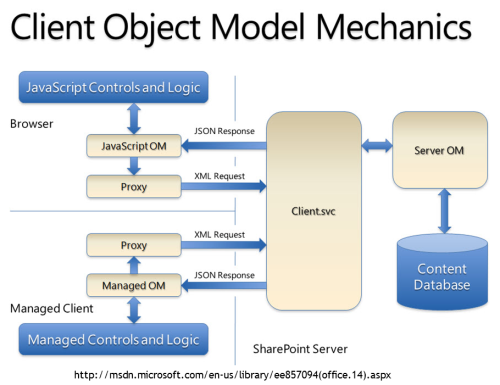
Client Object Model Architecture
All the calls that are made from the client object model are in the form of an XML file which is first posted to the WCF Web Service called Client.svc, the web server processes the request and returns back the response as a JSON (JavaScript Object Notation), it is the responsibility of the client object model to transform it into objects to be used within the code.
Server Object Model
Whereas Server Object Model is used to access data from within SharePoint where SharePoint Server is installed and configured. There are many objects available, some of the frequently used ones are as follows:
- SPFarm
- SPWebApplication
- SPContext - ClientContext
- SPSite - Site
- SPWeb - Web
- SPList - List
- SPListItem - ListItems
- SPDocumentLibrary
- SPSiteDataQuery

Comments
Post a Comment